

Woot!
We got your request. Hang on tight and we'll get back to you!
 Assessment Management
Run structured security assessments across systems, teams, and vendors—all from one place.
Assessment Management
Run structured security assessments across systems, teams, and vendors—all from one place.
 Questionnaires & Surveys
Launch structured questionnaires and collect evidence from the people closest to each control.
Questionnaires & Surveys
Launch structured questionnaires and collect evidence from the people closest to each control.
 Reports & Scorecards
Turn assessments into audit-ready reports and actionable insights your team can actually use.
Reports & Scorecards
Turn assessments into audit-ready reports and actionable insights your team can actually use.
 Inventory Management
Maintain a connected inventory of vendors, assets, and systems linked to assessments and risks.
Inventory Management
Maintain a connected inventory of vendors, assets, and systems linked to assessments and risks.
 Exception Management
Log, track, and resolve policy exceptions so nothing falls through the cracks during audits.
Exception Management
Log, track, and resolve policy exceptions so nothing falls through the cracks during audits.
 Risk Management
Turn assessment findings into a living risk register with owners, remediation plans, and full lineage.
Risk Management
Turn assessment findings into a living risk register with owners, remediation plans, and full lineage.
 Information Security Risk Management (ISRM)
Run assessments across units and systems, maintain IT asset inventories, and collaborate on a shared risk register—all in one place.
Information Security Risk Management (ISRM)
Run assessments across units and systems, maintain IT asset inventories, and collaborate on a shared risk register—all in one place.
 Third-Party Security Risk Management (TPSRM)
Track vendors, send security questionnaires, and manage third-party risk with built-in workflows and a centralized inventory.
Third-Party Security Risk Management (TPSRM)
Track vendors, send security questionnaires, and manage third-party risk with built-in workflows and a centralized inventory.


See completion status, participation rates, and scoring across all assessments in one view. Spot delays early and keep campaigns on track without manual follow-up.
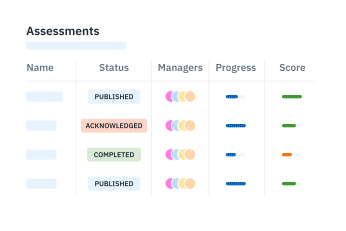
Organize assessments into series by regulatory standard or internal objective. Run GLBA, NIST, and HIPAA campaigns from the same dashboard without separate tracking systems.

Access completion rates and scores by department, vendor, or framework to identify areas that need more support or resources.

Set notifications for upcoming deadlines so assessments complete on time. Reduce manual follow-ups and eliminate the last-minute scramble before audits.